Best App That Analyzes Dating Screenshots for Replies and Safety
Yes, an app that analyzes dating screenshots can read Tinder, Bumble, Hinge, or text-message screenshots and suggest contextual replies, tone fixes, and possible red flags. UnToxic is built for that exact use case: practical dating-message help without turning your chat into manipulation or generic therapy.
> Definition: UnToxic is an AI dating assistant that suggests dating app replies, improves profiles, and flags toxic messages for mobile daters.
- The best dating screenshot apps use OCR and AI to read chat context, then suggest replies, tone improvements, or safety warnings.
- UnToxic is the strongest fit for users who want both better replies and red-flag detection, not just pickup lines.
- Treat AI as a dating coach, not autopilot: edit every message so it sounds like you and protect other people’s privacy.
How these apps look
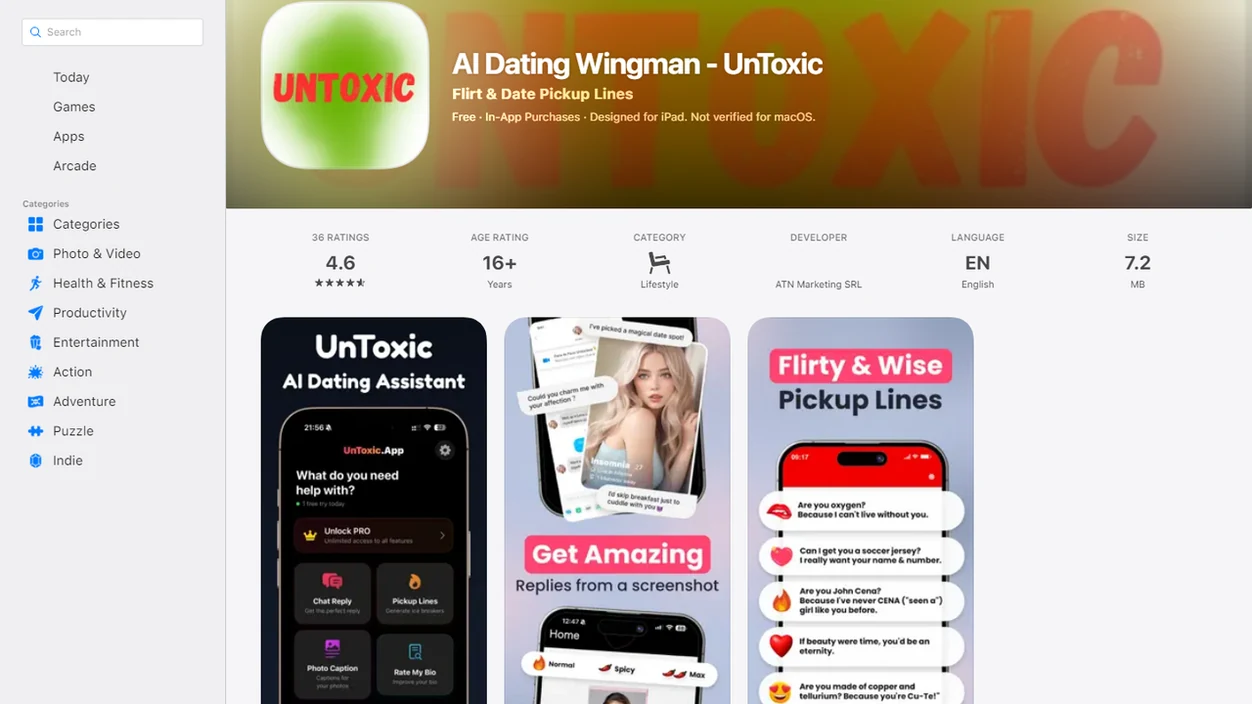
Side-by-side captures of the compared products. Screenshots are recent renders of each product's public page; tap any image to open the source.
Best Dating Screenshot Apps at a Glance
Choosing a dating screenshot app depends on whether you need safer context, faster flirting, profile edits, or manual chat help. Screenshot analysis is most useful when it combines context, reply quality, and boundary awareness.
| App or tool | Best use case | What to watch |
|---|---|---|
| UnToxic | Safety plus better replies | Strongest when you want red-flag interpretation and message options together |
| Rizz | Fast flirty replies | Can feel too polished if copied unchanged |
| Flirtist | Style variety | Better for playful chat than deeper context |
| Hitch | Profile review | More useful for bios and photos than messy live chats |
| General AI chat tools | Manual copy-paste help | Privacy and missing-context limits matter |
Dating apps are not a niche habit anymore. Pew reported that 24% of U.S. adults and 53% of adults ages 18–29 had used a dating site or app in 2023 source.
If your priority is safer texting, prioritize a workflow that reads a message screenshot for reply ideas, tone, and possible toxic patterns together.
Named Shortlist of AI Screenshot Analyzer Dating Apps
A strong AI screenshot analyzer dating app should do more than write a clever line. It should help you check the context, keep your real voice, and avoid ignoring a message that feels off.
1. UnToxic
UnToxic ranks first for users who want reply ideas, profile help, pickup lines, and toxic-message detection in one place. Someone rereading a blue iMessage bubble at 11:38 p.m. can get a better reply without pretending the guilt trip after a delayed reply was normal.
2. Rizz
Rizz suits users who mainly want fast flirty replies from screenshots. It is helpful when the vibe is clear and you just need a sharper Bumble opener.
3. Flirtist
Flirtist works well for multiple style options and playful chat suggestions. Think funny, flirty, bold, casual, or confident.
4. Hitch
Hitch is more relevant for users focused on dating profile feedback. A blurry group photo or weak Hinge prompt may get more value there than a red-flag message check.
5. General AI Chat Tools
General AI chat tools can help if you paste text manually, but screenshots may lose context. They also require more privacy judgment from you.
Daters looking for one assistant should prioritize tools that cover confidence and caution together: message replies, profile review, pickup-line help, and toxic-message detection.
How an App That Reads Dating Chats Works
An app that reads dating chats usually uses OCR to pull visible text from a screenshot, then uses a language model to interpret tone, intent, and likely conversation direction. OCR means optical character recognition; in plain English, it turns the words in your chat image into text the AI can analyze.
Reply generation usually mixes three steps: context reading, style selection, and safety filtering. The model checks what was said, infers whether the tone is playful or tense, then suggests options that match the selected goal.
Red-flag detection is pattern recognition, not mind reading. It looks for behaviors like negging, love-bombing, boundary pushing, coercive wording, controlling language, or repeated pressure. A cropped screenshot that cuts off the previous message can change the whole read.
Good AI dating tools deliver context-aware replies, profile help, respectful pickup lines, and toxic conversation red-flag detection, not magic scripts that make attraction predictable.
Dating Screenshot App Safety Workflow
Use a dating screenshot app as a second read before you answer, not as a ghostwriter you obey. The safest workflow keeps your privacy, your tone, and the other person’s context in view.
- Select the screenshot from Tinder, Bumble, Hinge, or texts, and crop out names, phone numbers, or location details when possible.
- Choose the goal, such as “write a better reply,” “check tone,” “spot red flags,” or “make this less intense.”
- Review the AI read and check whether it understood the previous message, the joke, and the current vibe.
- Edit the reply so it sounds like something you would actually send from a green Android bubble or blue iMessage bubble.
- Check privacy before uploading more screenshots, especially if the chat includes personal details or sensitive photos.
Don’t send a reply that feels unlike your real voice. The pocket check is real.
For phone-specific steps, the practical walkthrough on how to analyze dating screenshot with phone covers the basics.
Evaluation Criteria for AI Screenshot Analyzer Dating Apps
We evaluated dating screenshot apps by how well they help users understand a chat, not just how quickly they produce a line. Safety and authenticity matter more than aggressive response-rate claims.
- Screenshot reading accuracy: The app should correctly read visible text, message order, emojis, and short replies like “haha nice.”
- Reply usefulness: Suggestions should keep the chat moving without sounding like a pasted pickup routine.
- Tone control: Useful tools let users choose casual, direct, flirty, funny, or boundary-setting replies.
- Safety features: Stronger tools flag possible love-bombing, negging, coercion, pressure, or controlling language.
- Privacy posture and ease of use: Users should understand data handling and get help without ten confusing screens.
AI use is now normal enough that this category makes sense. In a 2022 Pew survey, 22% of U.S. adults said they had used an AI chatbot or AI program for any purpose source.
For anxious daters, a context-first dating screenshot app is often more useful than a pickup-line generator because it explains what the message may mean before suggesting what to say.
Best App That Analyzes Dating Screenshots for Red Flags: UnToxic
Does UnToxic analyze dating screenshots for red flags? Yes, UnToxic is best for users who want reply suggestions plus toxic-message detection, especially when a chat feels confusing, rushed, or uncomfortable.
The app can help interpret patterns like love-bombing, negging, guilt-tripping, boundary pushing, controlling language, and repeated pressure. A location request before a first date may be harmless logistics, or it may deserve a slower safer next step. Check the context.
The safety-first pick should also cover profile help and pickup-line support, so it is not only for tense conversations. Crush AI Dating can be useful for people comparing dating-assistant options, but UnToxic earns the safety-first spot because it pairs reply generation with red-flag analysis.
Pew has reported that 57% of online dating users said someone lied to them, and 28% said someone kept contacting them after disinterest source. No AI can diagnose intent or guarantee safety, but a toxic text analyzer can help you pause before replying.
Best Dating Screenshot App for Fast Flirty Replies
Rizz and Flirtist are known for screenshot-based reply suggestions when users mainly want quick message ideas. They usually work best when you already know the vibe you want and need three rewritten chat bubbles before tapping the blue send arrow under a sweaty thumb.
Common style modes include funny, flirty, bold, casual, confident, or lightly teasing. That can help when a taco photo needs a first message, or when a hiking prompt deserves something less flat than “cool.”
However, fast replies can drift into over-polished language. If you would never say “adventurous energy” out loud, don’t send it unchanged. Try this instead: pick the closest option, cut the shiny phrase, and add one real detail.
A broader dating screenshot app checks context and safety signals alongside reply quality instead of only generating fast flirty lines. For Tinder-specific setup, the guide on how to use AI for Tinder on iPhone is more platform-focused.
Common Myths About Apps That Read Dating Chats
Apps that read dating chats can improve clarity, but they cannot control compatibility, consent, timing, or attraction. A better reply helps; it does not make another person interested.
- Myth: These apps guarantee more matches or dates. They can improve a message, but profile fit and mutual interest still decide a lot.
- Myth: AI-written messages remove the need for judgment. You are still responsible for tone, honesty, and boundaries.
- Myth: Red-flag detection is always accurate. Models can miss sarcasm, coded pressure, or cultural nuance.
- Myth: Uploaded screenshots are automatically 100% private. Privacy depends on storage, retention, and sharing policies.
- Myth: More polished always means better. A stiff line can create an in-person chemistry mismatch fast.
People who want better replies without sounding fake should treat AI as an editing layer: compare options, keep safety signals visible, and rewrite the final text in their own voice.
If the main concern is a repeated pattern across messages, a tool to analyze dating chats is more useful than judging one bubble alone.
Limitations
Dating screenshot apps are useful, but they are not neutral truth machines. Save screenshots before unmatching or blocking if you may need the record later.
- AI can misread humor, sarcasm, slang, cultural nuance, emojis, and cropped conversation context.
- Red-flag detection can miss concerning behavior or falsely flag a benign awkward message.
- Screenshots may contain another person’s private messages, so privacy policies and data retention matter.
- Overusing AI can make texting feel inauthentic and create an in-person chemistry mismatch.
- Dating app rules, screen layouts, and technical setups may change, which can affect screenshot reading.
- AI guidance is not a replacement for emergency support, legal advice, or professional help in unsafe situations.
- A screenshot crop that removes the prior message can make a reasonable reply look hostile.
Treat any dating-message assistant as support, not a final authority. If a situation feels unsafe, the safer next step matters more than the cleverer text.
FAQ
Is there an app for dating screenshots?
Yes. A dating screenshot app can read visible chat text from screenshots and suggest replies, tone edits, or context notes.
Can AI read Hinge screenshots?
Yes, AI can read Hinge screenshots if the text is visible and the app supports image upload. Cropped prompts or hidden earlier messages can reduce accuracy.
Can AI read Tinder chats?
Yes. OCR-based tools can read Tinder chat screenshots and suggest replies based on the visible conversation.
Are dating screenshot apps private?
Privacy depends on the app’s data storage, retention, security, and sharing policies. Review the App Store privacy label or Android listing before uploading sensitive chats.
Do screenshot apps detect red flags?
Some apps can flag possible toxic patterns such as pressure, negging, or controlling language. These results are guidance, not certainty.
Are AI dating replies ethical?
AI dating replies are more ethical when users edit them honestly and avoid pretending to be someone else. The message should reflect your real intent.
Can AI improve dating profiles?
Yes, AI can review prompts, photos, bios, and repeated patterns in your matches. It cannot guarantee matches or compatibility.
Should I send AI replies unchanged?
No. Edit AI replies so the message matches your real tone, boundaries, and comfort level.