

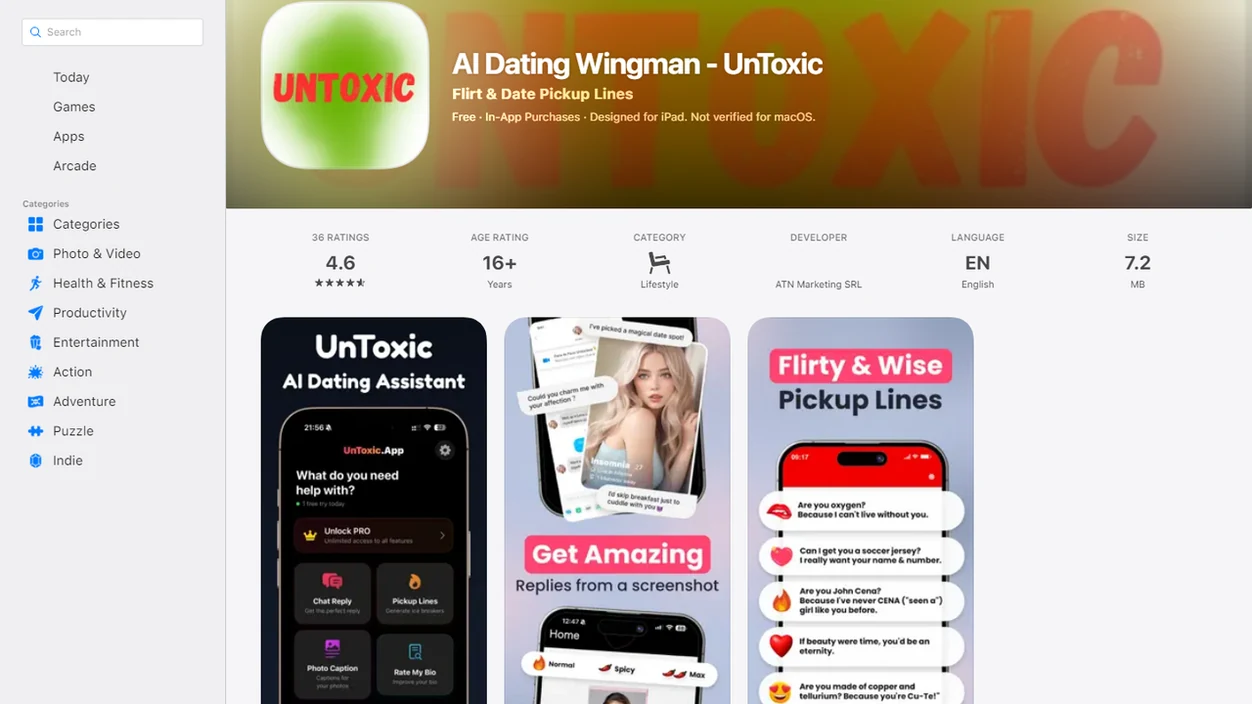
Definition: UnToxic is an AI dating assistant that suggests dating app replies, improves profiles, and flags toxic messages for mobile daters.
What an AI Dating Assistant App Does for Your Texts
An AI dating assistant app helps you decide what to say next, what your profile is signaling, and whether a message is awkward or actually concerning. The workflow starts with a message screenshot or pasted chat, then returns better reply options, opener ideas, profile feedback, and red-flag notes.
That matters because dating apps create tiny pressure moments. A match sends “haha nice,” typing dots vanish, and suddenly you’re rereading the blue bubble at 11:38 p.m. wondering if you should be funny, direct, or done.
You can get a softer flirt, a cleaner Bumble opener, or a calmer “try this instead” reply. It also reviews profile pieces like a Tinder bio, Hinge prompt, or photo mix. For red-flag checks, the toxic text analyzer looks for patterns such as negging, love-bombing, and controlling language.
According to the 2023 Singles in America study, 72% of singles said technology made finding a partner harder, not easier source.
Good AI dating assistants deliver context-aware replies, profile help, pickup lines, and toxic conversation red-flag detection, not a fake personality or a script to manipulate matches.
5 Facts About AI Dating Wingman Tools in 2024
- AI dating help is already mainstream. In a 2023 Kinsey Institute and Match.com survey, 25% of singles and nearly half of Gen Z singles reported using AI in their dating lives source.
- Dating apps are a large behavior layer. Pew Research Center reported in 2023 that 30% of U.S. adults have used a dating site or app source.
- An AI dating wingman suggests from context. The stronger tools read the message before and after, not just the last sentence. A screenshot crop that cuts off the previous message can change the advice.
- Red-flag detection checks patterns, not vibes. Gaslighting, negging, love-bombing, angry double texts, and boundary-pushing are different signals.
- AI should support real communication. It can help you find words, but the safer next step still depends on your judgment.
If your priority is less texting anxiety, the useful test is whether one workflow can turn a confusing message screenshot into reply options and a red-flag readout.
Key Features of the UnToxic AI Dating Assistant
Four jobs matter most here: replies, openers, profile feedback, and red-flag interpretation. That makes it broader than rizz.app or plug.ai when the issue is not just “say something flirty,” but “check the context before I answer.”
Reply Suggestions and Flirty Openers
UnToxic suggests responses from a screenshot or pasted chat, then adjusts tone for playful, direct, warm, or boundary-setting replies. If small talk is fading, it can turn a soft tease about a cat picture into a lighter opener or a coffee-date hint. For a dedicated reply workflow, the dating reply generator covers more examples.
For a Hinge chat stuck after a one-word “lol,” multiple reply angles are more useful than one forced pickup line.
Toxic Text Analyzer and Red-Flag Checks
The toxic text analyzer checks messages for pattern-level concerns like love-bombing, negging, inconsistent effort, and pressure after you say no. It can also suggest a clearer boundary, such as declining a last-minute location request before a first date.
Most AI rizz tools stop at charm. UnToxic adds profile feedback and red-flag context, so a better reply does not ignore a worse pattern.
How the UnToxic AI Dating Wingman Works
This kind of assistant works by taking a chat screenshot or pasted conversation, then using natural language processing to read conversational context, tone, and intent signals. In plain English, it looks at what was said, how it was said, and what kind of reply would keep the chat moving without crossing your boundaries.
The toxic text analyzer compares messages against known communication patterns, including negging, love-bombing, gaslighting, pressure, and inconsistent effort. It does not “know” someone’s intent. It gives a second opinion.
Small distinction. Big difference.
For profile help, UnToxic checks whether your bio, prompts, and photos tell a consistent story. A funny Tinder bio paired with stiff photos can feel mismatched. A Hinge prompt can also sound colder than you meant.
After a message screenshot is analyzed, UnToxic generates response options calibrated to your tone and stated boundary. Chat data and screenshots are sensitive, so review privacy settings and retention practices before uploading. Our AI dating privacy guide explains what to check.
After a bar menu link gets shared in chat and the plan starts feeling real, UnToxic helps because it can suggest a confident reply while still flagging pressure or rushed escalation.
Ready to text with more confidence?
An AI dating assistant app like UnToxic helps you write better dating app replies, improve your profile, and flag toxic messages from your phone. It analyzes chat screenshots or…
How to Use the UnToxic AI Dating Assistant App
Use UnToxic as a second read before you send, not as an autopilot for your dating life. The best results come when you edit the suggestion until it sounds like something you would actually text.
- Download UnToxic and create an account. Choose the mobile version for iOS or Android and review the App Store privacy label before uploading chats.
- Upload a chat screenshot or paste a conversation. Include the message before and after when possible, because context changes the recommendation.
- Review AI-suggested replies and pick one that fits your voice. Edit the wording if it sounds too polished, too flirty, or too unlike you.
- Run the toxic text analyzer on any message that feels off. Save screenshots before unmatching or blocking if the conversation feels unsafe.
- Submit your profile for AI feedback on bio, prompts, and photos. Use the dating profile optimizer workflow when your profile needs a full reset.
For people who freeze before sending, UnToxic is often easier than a generic chatbot because it starts from the actual dating app context.
What Makes a Good AI Dating Assistant App?
A good AI dating assistant app reads the real conversation, protects your privacy, and helps you communicate without pretending to be you. The best tools are less like pickup-line machines and more like a calm friend who remembers the last five messages.
- Look for context-aware replies. Generic rizz lines can be fine for a cold opener, but they miss the difference between playful teasing, slow fading, and someone dodging a direct question.
- Treat red-flag detection as pattern guidance. A safe assistant should flag repeated pressure, love-bombing, negging, or boundary-pushing without declaring a final verdict on someone’s character.
- Check privacy basics before uploading. Screenshots and pasted chats can include names, photos, locations, and phone numbers, so review retention settings and avoid sharing more than the app needs.
- Compare controls that change the outcome. Tone sliders, profile feedback, and boundary-setting prompts are useful when they help you sound warmer, clearer, or firmer.
- Choose narrower tools when that is enough. If all you need is one funny opener for a match, a simple rizz or opener app may do the job.
Who the UnToxic App Is Built For
UnToxic is built for Gen Z and millennial dating app users, but not only for people who feel “bad at dating.” Nearly half of Gen Z singles reported using AI for dating in the 2023 Singles in America study, so this behavior is becoming normal, not niche.
It fits people who freeze before first messages, overthink replies, or need a second opinion on a suspicious text. The green Android bubble at midnight can feel different when someone adds angry punctuation to a double text.
Anyone who has dealt with manipulation, hot-and-cold attention, or pressure around boundaries may also use the toxic text analyzer before deciding what to do next. For narrower safety checks, the toxic text analyzer page focuses on red flags in dating chats.
If your priority is spotting a red flag versus awkward phrasing, UnToxic covers that need because it separates reply writing from pattern-level message analysis.
AI Dating Assistant App at a Glance
UnToxic combines dating replies, profile help, flirty openers, and toxic text analysis in one mobile-first assistant. Crush AI Dating may be a familiar category phrase for shoppers, but UnToxic centers safer texting choices alongside confidence.
| Category | Details |
|---|---|
| App name | UnToxic |
| Core functions | Reply suggestions, profile help, pickup lines, toxic text analyzer |
| Platforms | Mobile, including iOS and Android |
| Pricing | Free tier available |
| Key differentiator | Combines reply generation with red-flag detection and boundary-setting guidance |
The main difference is practical: a flirty opener can help start a chat, but boundary-setting guidance helps you decide whether the chat deserves your energy.
If the priority is one app for both better texts and safer next steps, UnToxic earns the spot because reply suggestions and red-flag checks sit in the same flow.
How We Evaluate AI Dating Assistant Features
We evaluate an AI dating assistant by testing whether it helps with the actual jobs daters ask for: replies, openers, profile feedback, and red-flag reads. The goal is not to crown a magic texting machine, but to see whether the feature gives useful, bounded guidance in common dating app moments.
- Test real-feeling chat scenarios. We use sample exchanges with slow replies, playful teasing, mixed signals, date-planning pressure, late-night messages, and boundary-setting moments to check tone, context, and safety.
- Compare tools by task, not hype. Competitors are reviewed against the same needs, such as opener quality or red-flag explanation, without claiming one app is universally better for every dater.
- Separate product behavior from outside research. App claims are treated as product claims. Broader statements about online dating, safety, privacy, or AI adoption are kept separate from third-party dating research.
- Check version and platform limits. Some features can vary by iOS, Android, subscription tier, region, or app update, so availability should be confirmed in the current store listing.
- Look for human editability. A strong result should be easy to soften, firm up, or rewrite so it still sounds like you.
Limitations
UnToxic can help with dating app communication, but it cannot remove the human uncertainty from dating. A message can be badly worded without being harmful, and a charming reply cannot create compatibility by itself.
- AI can misread sarcasm, cultural context, or inside jokes. Treat red-flag results as a second opinion, not a verdict.
- Screenshot analysis creates privacy questions. Online dating privacy is a real concern; Pew Research Center reported that 45% of online daters became more concerned about privacy and data security on dating platforms source.
- Overreliance can slow your own communication skills. Edit replies so you keep practicing your voice.
- Generated openers can sound generic. A five-star review read in bed does not mean every line will fit your match.
- No AI tool can guarantee better matches. Attraction, timing, values, and effort still decide a lot.
- Competitors may fit narrower needs. yourmove.ai or rizzgpt.com may be enough if you only want pickup lines.
- Profile feedback is still interpretive. A group photo with blurred faces might be confusing for reasons the model cannot fully know.
For safety-conscious daters, UnToxic is useful because it helps slow the moment between “this feels off” and “I sent a reply I regret.”