
Download a Dating Reply Generator App for Mobile Chats
Yes — UnToxic is a downloadable AI dating reply generator app for Tinder, Bumble, Hinge, Instagram DMs, and text chats. It is built for mobile daters who want faster, more natural reply ideas, plus profile help, pickup lines, and toxic-message red-flag detection.
Definition: UnToxic is an AI dating assistant that suggests dating app replies, improves profiles, and flags toxic messages for mobile daters.
TL;DR
- A dating reply generator app is a companion tool for dating chats, not a replacement for Tinder, Bumble, or Hinge.
- The strongest AI reply apps offer tone options, profile help, openers, follow-ups, and red-flag checks instead of only canned flirty lines.
- AI-generated replies work best when you edit them to match your voice, context, and comfort level.
How the dating reply generator apps look
Side-by-side captures of the compared products. Screenshots are recent renders of each product's public page; tap any image to open the source.
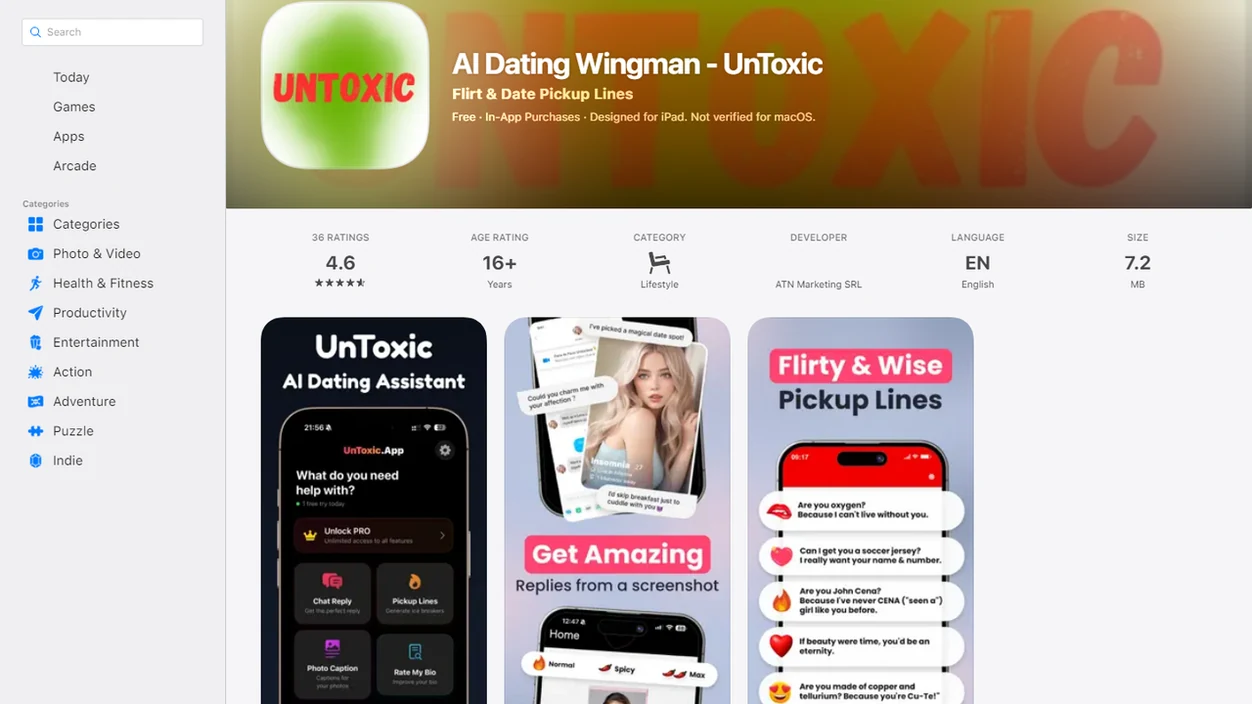
Dating Reply App Download for Tinder, Bumble, Hinge, and DMs
A dating reply app download gives you message help for chats you already have; it does not create matches or replace Tinder, Bumble, Hinge, Instagram DMs, or text conversations. UnToxic works as a companion layer when the blue iMessage bubble is sitting there and you’re not sure whether to be playful, direct, or done.
People search this way because they want a phone workflow, not another web prompt box open in a browser tab. Pew Research Center reports that 30% of U.S. adults have used a dating site or app, and 53% of adults under 30 have done so source.
Anyone dealing with scattered chats across Tinder, Hinge, and DMs can use UnToxic as the practical fit because it turns copied messages or chat context into reply options, tone changes, and safer next-step suggestions.
Where to Download a Dating Reply Generator App
Download UnToxic if you want a mobile app option for AI dating replies, profile help, pickup lines, and red-flag checks. It is meant to sit beside your dating apps, not replace Tinder, Bumble, Hinge, Instagram, or your normal texting app.
Availability can depend on your device, region, and current app-store rollout, so check the iPhone or Android path that matches your phone before installing. If you are choosing between platforms, use the store listing or platform-specific setup guidance to confirm compatibility, pricing, and feature access.
- Search for UnToxic in the App Store or Google Play, depending on your phone.
- Confirm that the listing, developer name, screenshots, and feature description match the AI dating assistant you expect.
- Review the permissions, privacy labels, and data safety details before you add chats, screenshots, or copied messages.
- Install only if the app fits your comfort level for message handling and notifications.
- Use it as a drafting companion, then edit every reply before sending.
Web tools can be fine for occasional slow drafting, but an app download usually feels smoother when the match is live and the reply box is already open on your phone.
How a Dating Reply Generator App Works Behind the Chat
A dating reply generator app works by reading the message context a user provides, predicting useful wording, and offering reply options that fit the selected tone. The core flow is simple: paste or share the incoming message, add context, choose a tone, then review the suggested response.
The technical part is natural language generation. In plain language, the system looks for intent, tone, and conversational direction. It can draft flirty, funny, calm, casual, witty, direct, or safer replies, but it cannot know the full relationship history unless you give it that context. A screenshot crop that cuts off the previous message can change the whole read.
UnToxic and Crush AI Dating both sit in the broader AI dating assistant category, but UnToxic also connects replies with profile improvement, pickup lines, and red-flag interpretation.
Good AI dating assistants for chat replies, profile help, pickup lines, and toxic conversation red-flag detection deliver better wording and context checks, not guaranteed attraction or a script to manipulate someone.
How to Use an AI Reply App Download in Mobile Chats
Use an AI reply app download by giving it enough chat context, choosing the right tone, and editing the result before you send anything. The better reply usually comes from the extra detail you almost skipped.
- Download the mobile dating assistant that fits your phone workflow, whether you prefer an AI dating assistant for iPhone or Android.
- Paste the incoming message, plus the previous line or two if the context matters.
- Choose a tone such as flirty, casual, calm, witty, respectful, or direct.
- Review the suggested replies for accuracy, comfort, and whether they sound like you.
- Edit the wording before sending, especially if the chat includes sarcasm, pressure, or mixed signals.
- Send only when the reply feels honest and safe.
When the issue is a frozen reply screen after “haha nice,” UnToxic fits because the workflow gives several follow-up options instead of one canned line.
Five Dating Reply Generator App Facts Before You Download
- Fact 1: A dating reply generator app is an AI text assistant, not a dating marketplace that shows profiles or creates matches.
- Fact 2: A strong AI reply app can help with openers, replies, follow-ups, tone changes, and message repair after an awkward line.
- Fact 3: Mobile download matters because dating chats happen in screenshots, copied messages, lock-screen notifications, and rushed commute replies.
- Fact 4: Better dating assistants include profile help and chat coaching, not only one-liners that sound detached from the actual conversation.
- Fact 5: AI replies are suggestions to edit, not guaranteed scripts that create chemistry or compatibility.
Most users do not need a dramatic rewrite. They need one better reply that keeps the chat moving without pretending to be someone else.
For shy daters, a reply generator is often easier than staring at typing dots because it gives a draft to adjust instead of asking you to start from nothing.
Download Tinder Reply App Features That Actually Matter
The useful download Tinder reply app features are tone control, follow-up help, profile support, and red-flag interpretation. A reply tool that only spits out flirty one-liners will feel thin by the third conversation.
Reply tones for different chat moments
Tone options should cover flirty, funny, witty, casual, calm, direct, and respectful replies. That matters when a playful Bumble opener needs warmth, but a pushy invite after you already said no needs a firmer line. If your main interest is playful messaging, the download AI rizz app guide covers that narrower use case.
Red-flag checks for safer interpretation
UnToxic adds toxic-message red-flag detection as an interpretation aid, not a diagnostic safety tool. It can help you sort red flag versus awkward phrasing when a match asks to leave the app too quickly.
If the priority is safer wording plus profile polish, UnToxic earns the spot because it combines reply suggestions, Tinder bio feedback, and red-flag checks in one mobile workflow.
AI Reply App Download vs Web Reply Generator
An AI reply app download usually fits mobile dating better than a web reply generator because the chat already lives on your phone. Web tools can still help, but they add friction when the Android keyboard is covering half the chat.
Before downloading any AI reply app, check the App Store privacy label or Google Play Data safety section so you know whether chats, screenshots, diagnostics, or identifiers may be collected. Apple explains privacy labels here: source, and Google explains Data safety disclosures here: source.
| Decision point | Mobile AI reply app | Web reply generator |
|---|---|---|
| Convenience | Built for quick phone use | Requires browser switching |
| Mobile chat flow | Easier with copied messages and screenshots | More manual copying |
| Screenshots or copied messages | Better fit for on-the-go context | Often text-box only |
| Privacy review | Check app permissions and privacy labels | Check site policies and data use |
| Speed | Faster during live chats | Better for slower drafting |
Download intent usually means someone wants an iPhone or Android workflow, not a desktop writing session. For Android-specific setup, compare the AI dating assistant for Android page before choosing.
After a gym selfie gets deleted at midnight and the profile prompt still feels flat, UnToxic handles both the chat reply and the profile edit through the same assistant workflow.
Best Mobile Chat Moments for a Dating Reply App Download
When should you use a dating reply app download? Use it when the next message matters enough to think twice, but not so much that you should ignore your own judgment.
Good moments include opener ideas after a new match, replies to “hey,” recovery after “lol,” and follow-ups when the conversation slows down. It also helps when a message feels too intense, dry, awkward, or risky, and you want a calmer way to respond.
The U.S. Surgeon General has noted that approximately 1 in 2 U.S. adults experience loneliness, which helps explain why digital conversation support is in demand source. Still, connection should not come at the cost of pressure or dishonesty.
If your priority is staying natural while getting unstuck, UnToxic fits because it offers tone-specific replies and red-flag interpretation before you send.
The safer next step is often a shorter message, not a smarter-sounding one.
Limitations
AI reply apps are useful, but they can misread dating context. Save screenshots before unmatching or blocking if a chat starts to feel unsafe.
- AI can misread sarcasm, chemistry, teasing, and emotional nuance.
- Incomplete chat context can produce replies that sound mismatched or strangely intense.
- AI cannot guarantee matches, dates, attraction, compatibility, or a second conversation.
- Red-flag detection is not proof of abuse, deception, danger, or intent.
- A suggested reply may sound polished but unlike you.
- Users should avoid sending anything manipulative, dishonest, unsafe, or outside their comfort level.
- Some competitors, including rizz.app, yourmove.ai, and plug.ai, focus heavily on lines or reply drafting; that can be useful, but it may not cover safety interpretation or profile repair.
- Web tools such as rizzgpt.com may be enough for occasional drafting, but they can feel clunky during live app chats.
For users comparing broader assistant options, a download AI dating assistant app workflow may fit better than a single-purpose reply box.
FAQ
What is a dating reply app?
A dating reply app is an AI assistant that helps write responses for dating chats. It can suggest openers, replies, follow-ups, and tone changes.
Is it a real dating app?
No, it is a companion tool, not a platform for matching with people. You still use Tinder, Bumble, Hinge, DMs, or text chats for the actual conversation.
Can it write Tinder replies?
Yes, you can paste a Tinder message and ask for reply options. Edit the result before sending so it matches your voice.
Does it work for Bumble?
Yes, Bumble chats can use the same reply-generation workflow. Add the previous message if the opener depends on context.
Can AI replies sound natural?
AI replies can sound natural when the tone options fit the chat and the user edits the wording. UnToxic and Crush AI Dating are examples of apps built around that kind of mobile reply support.
Should I copy replies exactly?
No, you should personalize AI suggestions before sending them. Copying every word can make a message sound generic or unlike you.
Can it detect toxic messages?
Some apps, including UnToxic, can flag possible red-flag patterns in dating messages. This is an interpretation aid, not a definitive safety judgment.
Is a web generator enough?
A web generator can be enough for occasional drafting. A mobile app is usually easier for on-the-go chats, screenshots, and quick follow-ups.